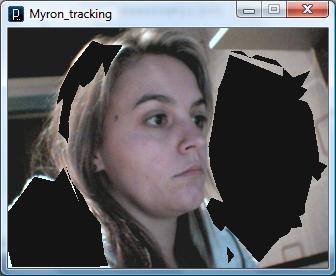
I downloaded this software for processing from the processing.org website. It includes a few examples of coeds for processing with video, including the following code for tracking:
import JMyron.*;
/*
This example shows a whole lot of different
tracking methods being rendered at one time.
Don't be surprised if this one runs really slowly.
last tested to work in Processing 0090
JTNIMOY
*/
import JMyron.*;
JMyron m;
void setup(){
int w = 320;
int h = 240;
size(w,h);
m = new JMyron();
m.start(320,240);
m.findGlobs(1);
println("Myron " + m.version());
}
void mousePressed(){
m.settings();
}
void draw(){
m.trackColor(255,255,255,255);
m.update();
int[] img = m.image();
//first draw the camera view onto the screen
loadPixels();
for(int i=0;i<width*height;i++){
pixels[i] = img[i];
}
updatePixels();
//draw an averaged color block where the mouse is.
noStroke();
int c = m.average(mouseX-20,mouseY-20,mouseX+20,mouseY+20);
fill(red(c),green(c),blue(c));
rect(mouseX-20,mouseY-20,40,40);
noFill();
int[][] a;
//draw center points of globs
a = m.globCenters();
stroke(255,255,0);
for(int i=0;i<a.length;i++){
int[] p = a[i];
point(p[0],p[1]);
}
//draw bounding boxes of globs
a = m.globBoxes();
stroke(255,0,0);
for(int i=0;i<a.length;i++){
int[] b = a[i];
rect(b[0], b[1], b[2], b[3]);
}
//draw edge pixels of globs (this and the next chunks of code are chokers)
int list[][][] = m.globPixels();
stroke(110,110,110);
for(int i=0;i<list.length;i++){
int[][] pixellist = list[i];
if(pixellist!=null){
beginShape(POINTS);
for(int j=0;j<pixellist.length;j++){
vertex( pixellist[j][0] , pixellist[j][1] );
// print( pixellist[j][0] +" " + pixellist[j][1] );
}
endShape();
}
}
//draw edge points (same as last, but vector based)
list = m.globEdgePoints(20);
stroke(0,128,0);
for(int i=0;i<list.length;i++){
int[][] contour = list[i];
if(contour!=null){
beginShape();
for(int j=0;j<contour.length;j++){
vertex( contour[j][0] , contour[j][1] );
}
endShape();
}
}
//draw quads - like bounding box, but a 4-pointed polygon.
a = m.globQuads(50,51);
stroke(0,0,100);
for(int i=0;i<a.length;i++){
int[] b = a[i];
quad(b[0], b[1],
b[2], b[3],
b[4], b[5],
b[6], b[7]);
}
}
public void stop(){
m.stop();
super.stop();
}
I therefore set to work with a few experiments!
My first experiment was to get it up and running... tick!
My second was to see exactly what it does and how I could adapt it.
I firstly tried to adapt it by altering the size of the sketch (As it's default size was quite small). The result:
As you can see it didn't work!!! I read on a forum online that it depends on the default settings of the webcam you are using. As my webcam is many years old...the biggest I could go to was 320 x 240, which is tiny, but at least it works for now! (I hope when using the cameras supplied by the college, I will be able to enlarge to 720 x 576 at least). But for now, here's the effect it creates, without any alterations to the code:
Now for a few experiments with alterations of the code. First, I wanted to see what happened if I cancelled out some of the code to get rid of the bounding boxes of the globs. My code now looks like this:
import JMyron.*;
/*
This example shows a whole lot of different
tracking methods being rendered at one time.
Don't be surprised if this one runs really slowly.
last tested to work in Processing 0090
JTNIMOY
*/
import JMyron.*;
JMyron m;
void setup(){
int w = 320;
int h = 240;
size(w,h);
m = new JMyron();
m.start(320,240);
m.findGlobs(1);
println("Myron " + m.version());
}
void mousePressed(){
m.settings();
}
void draw(){
m.trackColor(255,255,255,255);
m.update();
int[] img = m.image();
//first draw the camera view onto the screen
loadPixels();
for(int i=0;i<width*height;i++){
pixels[i] = img[i];
}
updatePixels();
//draw an averaged color block where the mouse is.
noStroke();
int c = m.average(mouseX-20,mouseY-20,mouseX+20,mouseY+20);
fill(red(c),green(c),blue(c));
rect(mouseX-20,mouseY-20,40,40);
noFill();
int[][] a;
//draw center points of globs
a = m.globCenters();
stroke(255,255,0);
for(int i=0;i<a.length;i++){
int[] p = a[i];
point(p[0],p[1]);
}
//draw bounding boxes of globs
a = m.globBoxes();
stroke(255,0,0);
for(int i=0;i<a.length;i++){
int[] b = a[i];
rect
}
//draw edge pixels of globs (this and the next chunks of code are chokers)
int list[][][] = m.globPixels();
stroke(110,110,110);
for(int i=0;i<list.length;i++){
int[][] pixellist = list[i];
if(pixellist!=null){
beginShape(POINTS);
for(int j=0;j<pixellist.length;j++){
vertex( pixellist[j][0] , pixellist[j][1] );
// print( pixellist[j][0] +" " + pixellist[j][1] );
}
endShape();
}
}
//draw edge points (same as last, but vector based)
list = m.globEdgePoints(20);
stroke(0,128,0);
for(int i=0;i<list.length;i++){
int[][] contour = list[i];
if(contour!=null){
beginShape();
for(int j=0;j<contour.length;j++){
vertex( contour[j][0] , contour[j][1] );
}
endShape();
}
}
//draw quads - like bounding box, but a 4-pointed polygon.
a = m.globQuads(50,51);
stroke(0,0,100);
for(int i=0;i<a.length;i++){
int[] b = a[i];
quad(b[0], b[1],
b[2], b[3],
b[4], b[5],
b[6], b[7]);
}
}
public void stop(){
m.stop();
super.stop();
}
And the result:
Still getting some bounding going on. So I am furhter cancelling out some more of the code (edge pixels of globs, bounding boxes e.t.c).
My code:
import JMyron.*;
/*
This example shows a whole lot of different
tracking methods being rendered at one time.
Don't be surprised if this one runs really slowly.
last tested to work in Processing 0090
JTNIMOY
*/
import JMyron.*;
JMyron m;
void setup(){
int w = 320;
int h = 240;
size(w,h);
m = new JMyron();
m.start(320,240);
m.findGlobs(1);
println("Myron " + m.version());
}
void mousePressed(){
m.settings();
}
void draw(){
m.trackColor(255,255,255,255);
m.update();
int[] img = m.image();
//first draw the camera view onto the screen
loadPixels();
for(int i=0;i<width*height;i++){
pixels[i] = img[i];
}
updatePixels();
//draw an averaged color block where the mouse is.
noStroke();
int c = m.average(mouseX-20,mouseY-20,mouseX+20,mouseY+20);
fill(red(c),green(c),blue(c));
rect(mouseX-20,mouseY-20,40,40);
noFill();
int[][] a;
//draw center points of globs
a = m.globCenters();
stroke(255,255,0);
for(int i=0;i<a.length;i++){
int[] p = a[i];
point(p[0],p[1]);
}
/*//draw bounding boxes of globs
a = m.globBoxes();
stroke(255,0,0);
for(int i=0;i<a.length;i++){
int[] b = a[i];
rect(b[0], b[1], b[2], b[3]);
}
*/
//draw edge pixels of globs (this and the next chunks of code are chokers)
int list[][][] = m.globPixels();
stroke(110,110,110);
for(int i=0;i<list.length;i++){
int[][] pixellist = list[i];
if(pixellist!=null){
beginShape(POINTS);
for(int j=0;j<pixellist.length;j++){
vertex( pixellist[j][0] , pixellist[j][1] );
// print( pixellist[j][0] +" " + pixellist[j][1] );
}
endShape();
}
}
/*
//draw edge points (same as last, but vector based)
list = m.globEdgePoints(20);
stroke(0,128,0);
for(int i=0;i<list.length;i++){
int[][] contour = list[i];
if(contour!=null){
beginShape();
for(int j=0;j<contour.length;j++){
vertex( contour[j][0] , contour[j][1] );
}
endShape();
}
}
*/
/* //draw quads - like bounding box, but a 4-pointed polygon.
a = m.globQuads(50,51);
stroke(0,0,100);
for(int i=0;i<a.length;i++){
int[] b = a[i];
quad(b[0], b[1],
b[2], b[3],
b[4], b[5],
b[6], b[7]);
}
*/
}
public void stop(){
m.stop();
super.stop();
}
My result:
This may have taken out too much detail. So here is my updated code:
import JMyron.*;
/*
This example shows a whole lot of different
tracking methods being rendered at one time.
Don't be surprised if this one runs really slowly.
last tested to work in Processing 0090
JTNIMOY
*/
import JMyron.*;
JMyron m;
void setup(){
int w = 320;
int h = 240;
size(w,h);
m = new JMyron();
m.start(320,240);
m.findGlobs(1);
println("Myron " + m.version());
}
void mousePressed(){
m.settings();
}
void draw(){
m.trackColor(255,255,255,255);
m.update();
int[] img = m.image();
//first draw the camera view onto the screen
loadPixels();
for(int i=0;i<width*height;i++){
pixels[i] = img[i];
}
updatePixels();
//draw an averaged color block where the mouse is.
noStroke();
int c = m.average(mouseX-20,mouseY-20,mouseX+20,mouseY+20);
fill(red(c),green(c),blue(c));
rect(mouseX-20,mouseY-20,40,40);
noFill();
int[][] a;
//draw center points of globs
a = m.globCenters();
stroke(255,255,0);
for(int i=0;i<a.length;i++){
int[] p = a[i];
point(p[0],p[1]);
}
/*//draw bounding boxes of globs
a = m.globBoxes();
stroke(255,0,0);
for(int i=0;i<a.length;i++){
int[] b = a[i];
rect(b[0], b[1], b[2], b[3]);
}
*/
//draw edge pixels of globs (this and the next chunks of code are chokers)
int list[][][] = m.globPixels();
stroke(110,110,110);
for(int i=0;i<list.length;i++){
int[][] pixellist = list[i];
if(pixellist!=null){
beginShape(POINTS);
for(int j=0;j<pixellist.length;j++){
vertex( pixellist[j][0] , pixellist[j][1] );
// print( pixellist[j][0] +" " + pixellist[j][1] );
}
endShape();
}
}
//draw edge points (same as last, but vector based)
list = m.globEdgePoints(20);
stroke(0,128,0);
for(int i=0;i<list.length;i++){
int[][] contour = list[i];
if(contour!=null){
beginShape();
for(int j=0;j<contour.length;j++){
vertex( contour[j][0] , contour[j][1] );
}
endShape();
}
}
/*
//draw quads - like bounding box, but a 4-pointed polygon.
a = m.globQuads(50,51);
stroke(0,0,100);
for(int i=0;i<a.length;i++){
int[] b = a[i];
quad(b[0], b[1],
b[2], b[3],
b[4], b[5],
b[6], b[7]);
}
*/
}
public void stop(){
m.stop();
super.stop();
}
And my result:
That's a bit better!
Now to get rid of the silly sqaure that follows the mouse around! Just cancelled code:
//draw an averaged color block where the mouse is.
noStroke();
int c = m.average(mouseX-20,mouseY-20,mouseX+20,mouseY+20);
fill(red(c),green(c),blue(c));
rect(mouseX-20,mouseY-20,40,40);
That's worked.
Now to play around with colours and effects...
Adding a fill to the shapes (in this case a black fill):
Red fill:
or taking the stroke away completely:
This is certainly a very exciting effect, and will try and perhaps incorporate it into my final piece.